What is Database Design in DBMS?
Database design in DBMS refers to the structure and entails processes and procedures for developing effective databases. It is not merely storing data but having it well organised, accurate, and retrievable when required. The database design, properly developed before the system implementation, is crucial to data integrity and organisational system efficiency.
Primary Terminologies Used in Database Design
Redundancy: Redundancy means having duplicate data in a database. Although redundancy can sometimes be useful, it’s usually avoided to save storage space and improve efficiency. For example, in a banking application, strict measures are taken to prevent redundant data.
Schema: A schema is a logical construction that defines how data is structured and organized in a database. It outlines tables with rows and columns and each column has a specific data type.
Records/Tuples: A record is similar to schema and is also called a tuple. It represents a single row in a table and contains all the stored data related to one item or entity.
Indexing: Indexing is a method used to speed up data retrieval in a database. It uses special structures to make searching for information faster and more efficient.
Data Integrity & Consistency: Data integrity means that the data stored in a database is accurate and reliable. Consistency means that the data is always correct and sticks to defined rules.
Data Models: Data models are frameworks that visually represent data and the relationships between them. Examples of data models are Relational Model, Hierarchical Model, Network Model, and Object-Oriented Model.
Normalization: Normalization is the process of organizing data to minimize redundancy and dependency. It involves dividing large tables into smaller ones and establishing clear relationships between them so that the data is consistent.
Functional Dependency: Functional dependency describes the relationship between two attributes in a table. It means the value of one attribute can determine the value of another. For example, if A determines B, it’s written as {A → B}.
Transaction: A transaction is a single logical operation in a database that changes data. It must follow specific rules, such as the ACID or BASE properties so that the data is reliable and consistent.
Schedule: A schedule is the order in which transactions are carried out in a database. It determines how multiple users or processes execute their operations.
Concurrency: Concurrency allows multiple transactions to happen at the same time without interfering with each other. It enables smooth functioning and consistency in shared databases.
Constraints: Constraints are rules applied to database fields to maintain data accuracy and integrity. Examples include NOT NULL (no empty values), UNIQUE (no duplicate values), and CHECK (specific conditions must be met).
Significance of Database Design
An excellent structure for an organised database implementation is very important if one is to develop systems that are coherent, standardised, and easily built. Let’s explore the key reasons why a solid database design matters:
- Consistency: Consistency brings in some element of standardisation to data. The basic objective behind a good dbms design is to ensure that only correct and only the necessary information is stored in the system.
- Cascading Relationships: Among all the relationships in DBMS, parent-child type relations are important when viewing data. A child record only makes sense if a parent record has the same name as the record for some other object. Preventing the use of the same data and, at the same time, maintaining the logical integrity of a data set.
- Redundancy Control: Every form of replication is unnecessary. Maintenance of double copies increases the complexity of the system and storage space. Normalisation assistance allows for the avoidance of repetitions when creating an SQL database, so it is important for their efficient construction.
- Optimised Queries: When this is done properly to organise the conceptual view of the databases in DBMS, the queries that are produced are easy and fast. This saves time when it comes to data access and increases the capability of a system.
- Performance Efficiency: A well-designed conceptual design in a DBMS helps ensure that the data to be stored is kept so that it can easily be retrieved. Data arrangement and indexation also help the system respond better, even as the database size increases.
- Easy Maintenance: Maintenance is easy when the database design strategies in DBMS have been followed appropriately. The readability and neatness of the logo keep it free of corruption and make updating or scalability an easy process.
Types of Databases
Databases are at the heart of data storage and management by different applications and businesses. They can be broadly divided into Relational Databases (SQL) and Non-Relational Databases (NoSQL). Each type has a different purpose depending on the needs of an application and can be used accordingly.
Relational Databases(SQL)
Relational databases store data in the form of tables with rows and columns thus making it easy to organise and access information. Relationships between the different tables in these databases are established using keys. For example, in a library database, one table might list books while another table lists borrowers. A common key can be something like a borrower ID that links the two tables. SQL (Structured Query Language) is used to manage and query this data. Relational databases are best for applications that require structured data and very good consistency, such as banking or inventory systems for businesses.
Non-Relational Databases(NoSQL)
NoSQL databases care capable of handling unstructured or semi-structured data like JSON or XML. Instead of tables, data is stored in the form of collections, documents, or graphs. Think of a social media app. It would use a NoSQL database to manage user profiles, posts, and comments, as they don't follow a strict format. These databases are best used for applications that need high scalability and flexibility, such as real-time analytics or e-commerce platforms.
Relational(SQL) vs. Non-Relational Databases(NoSQL)
| Relational Database (SQL) |
Non-Relational Databases (NoSQL) |
| Handles data with low velocity. |
Designed to handle high-velocity data. |
| Data typically arrives from one or a few locations. |
Data flows in from multiple locations. |
| Supports complex transactions. |
Optimised for simpler transactions. |
| Offers only read scalability. |
Supports both read and write scalability. |
| Manages structured data. |
Can handle structured, semi-structured, and unstructured data. |
| Prone to a single point of failure. |
Built to avoid single points of failure. |
| Requires a fixed schema for data storage. |
Schema-less; no fixed schema needed. |
| Handles smaller data volumes. |
Capable of managing large data volumes. |
| Transactions are written in a single location. |
Transactions occur across multiple locations. |
| Typically deployed vertically. |
Supports horizontal scaling. |
Important Stages in Database Design
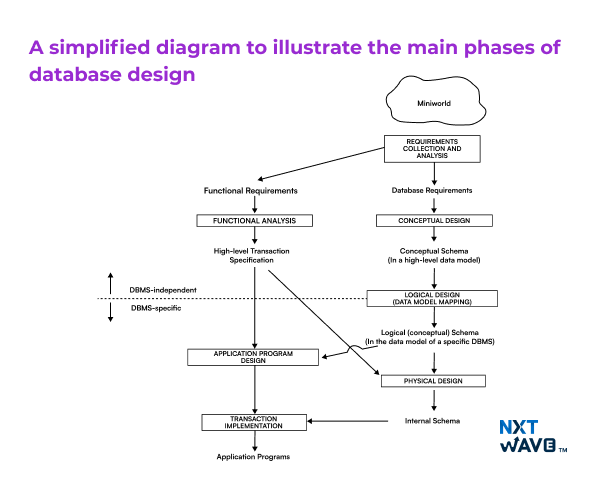
DBMS has a systematic method of designing the database through the database design process. The approach ensures that the database is easy to manage, increases data standardisation, and facilitates the execution of activities. This process consists of four key stages:
1. Requirements Collection and Analysis
In this step, database designers talk to the users to understand their data requirements. They conduct interviews to gather the necessary information and create a clear list of requirements. They also define the functional requirements of the application. These can include specific operations like retrieving or updating data that the system must support.
2. Conceptual Design
After gathering the necessary requirements, the next step is to create a conceptual schema. This is done using a high-level data model that provides the structure of the database. The conceptual schema has the data, entities, relationships, and constraints in simple terms, and it does not go into technical details. This makes it easy to communicate the design to non-technical users. The conceptual schema also serves as a reference to ensure that all user requirements are covered and do not conflict with each other.
3. Logical Design or Data Model Mapping
In this phase, the conceptual schema made in the last stage is transformed into a practical model that can be implemented in a database management system (DBMS). The high-level data model is mapped into a specific implementation model. It can be like a relational or object-relational database model. This step brings the design closer to real-world applications by preparing them for actual use in a DBMS. It consists of the following:
Dividing the information into tables
This step involves organising data into separate tables, which is a part of the logical design process. It lays the foundation for the physical storage of the data.
Turning information items into columns
Once data is divided into tables, this step defines individual data attributes. It then becomes columns in the respective tables.
Specifying primary keys
This is a crucial step in defining the table structure. It makes sure that each record can be uniquely identified. It helps in both the logical and physical models by establishing relationships and indexing mechanisms.
Creating the table relationships
Establishing relationships between tables through keys such as primary and foreign is essential. It is needed to maintain data integrity and the proper functioning of the database.
4. Physical Design
During physical design, the internal storage structures of the database are defined. This includes organising how data will be stored, creating indexes, determining access paths, and specifying file organisation for database files. Along with that, the application programs are designed based on high-level transaction specifications so that the database will operate as required. This step is about preparing the database for real-world use.
Schema Refinement
Schema refinement involves reviewing and improving the database schema. The step fine-tunes the structure of tables and relationships so the accuracy of the database design can be increased. It’s done in two ways:
Refining the design
This focuses on evaluating the database schema to remove inconsistencies. It involves optimising the structure of tables, relationships, and indexing to improve query performance and also to enable it to scale.
Refining the Product table
This involves fine-tuning its structure by proper normalisation, eliminating redundancy, and defining clear relationships. This step helps maintain data integrity, make queries easier, and improve overall database performance.
Applying the Normalization Rules
Normalisation is the process of organising data in a way that reduces redundancy and dependency. It removes anomalies like update, insert and delete. It divides the single tables into smaller ones linked with relationships.
First normal form (1NF): In 1NF, the database table must have only atomic (indivisible) values, and each record must be unique. This is done so each field contains only one value and eliminates repeating groups.
Second normal form (2NF): 2NF builds on 1NF, and the non-key attributes are fully dependent on the primary key. This eliminates partial dependency, where non-key attributes depend only on part of a composite key.
Third normal form (3NF): In 3NF, the database must be in 2NF, and there should be no transitive dependency. That means non-key attributes should not depend on other non-key attributes. This further reduces redundancy and ensures data consistency.
Types of Database Design Techniques
Let’s explore some database design techniques:
Hierarchical Database Design
A hierarchical database organises data in a tree structure, here, each item has a parent and can have many children. This design works well for places like company structures or file systems. It’s simple and easy to understand but can be limited when dealing with more complex relationships where many items are connected to each other.
Network Database Design
A network database uses a graph-like structure, allowing for more complex data relationships. Each item can have multiple parents and children hence, it is great for things like social networks or booking systems. It can handle complex data, but it can also be harder to manage and query than simpler models like hierarchical databases.
Object-Oriented Database Design
An object-oriented database stores data as objects, which is how object-oriented programming works. Each object holds both data and the actions that can be performed on it. This type works well for complex systems such as video games or financial software. However, it can be tricky to query and may require specific knowledge of programming.
Relational Database Design in DBMS
A relational database design in DBMS encompasses storing data in tables with rows for each record and columns for each piece of information. It’s the most common type and works well for apps like shopping websites or customer management systems. It’s reliable and supports easy data queries using SQL. However, it can struggle to handle complex and unstructured data.
NoSQL Database Design
NoSQL databases are flexible and don’t require a fixed structure which makes them best fit for handling large amounts of unorganised or rapidly changing data. They’re used in big data applications, social media, and real-time analytics. NoSQL is fast and scalable but doesn’t offer the same data consistency as relational databases.
Physical Database Design in DBMS
Physical database design deals with optimising the storage and retrieval of data. It accomplishes that by determining how data will be physically stored in the system. It involves selecting appropriate indexes, partitions, and storage formats. This design ensures efficient query performance and minimises disk usage.
Practical Example of a Database Design
Let’s consider a simple database design in DBMS for a library management system. This design will cover the essential steps and illustrate how data can be organised effectively.
1. Requirement Analysis:
- Data to be stored: Books, members, loans.
- Frequent operations: Adding new books, checking out books, returning books, and tracking due dates.
2. Conceptual Database Design:
Using the conceptual design in DBMS, create an ER diagram with entities and relationships:
- Entities: Book, Member, Loan.
- Relationships:
- A Member can borrow multiple Books.
- Multiple Members can borrow a Book over time.
3. Logical Database Design:
Convert the ER model into a relational database design in DBMS with the following tables:
- Book Table: BookID, Title, Author, ISBN.
- Member Table: MemberID, Name, Address, Phone.
- Loan Table: LoanID, BookID, MemberID, LoanDate, ReturnDate.
4. Schema Refinement:
Normalise the tables to reduce redundancy. For example, ensure Author information isn’t duplicated across multiple entries.
5. Physical Database:
Optimise the database by creating indexes on fields like BookID and MemberID for faster searches.
Feature of Good Database Design
Here are the features that make a database design good:
- Data Consistency: Ensures that the database contains accurate, uniform data throughout.
- Low Redundancy: Eliminates unnecessary duplication of data, making the database more efficient.
- Improved Performance: Fast query execution and data retrieval through optimised structures.
- Data Integrity: Enforces rules to maintain data accuracy and reliability (e.g., primary and foreign keys).
- Scalability: Can easily grow and adapt to handle increased data or system demands.
- Security: Protects sensitive data through access controls and encryption.
- Normalisation: Organizes data to reduce redundancy and improve data integrity.
- Easier Maintenance: Simplifies updating and managing data, ensuring long-term sustainability.
- Flexibility: This can be modified or extended as new requirements arise.
- Efficient Storage: Optimises space usage by properly structuring tables and data.
Conclusion
In conclusion, effective database design in DBMS is essential for building efficient, scalable, and secure systems. By sticking to the correct design procedures and constantly ensuring the reliability and coherency of data, redundancy control and performance improvement, the design of a database enormously improves both the perspective from the user’s point of view and from the engineer’s viewpoint who has the responsibility of maintaining the structure of the database. For any tool, system or application to be continually successful, it is mandatory to have a strong and flexible architecture that meets the present requirements and can fulfil future requirements.
Boost Your Placement Chances by Learning Industry-Relevant Skills While in College!
Explore ProgramFrequently Asked Questions
1. What is database design in DBMS?
Database design in DBMS refers to the process of structuring data according to a database model. It ensures data consistency, minimises redundancy, and supports efficient data retrieval.
2. Why is database design important?
Proper database design improves system performance, reduces redundancy, and ensures data integrity. It makes the database easier to maintain and scale.
3. What are the stages in database design?
The stages include requirement analysis, conceptual design, logical design, schema refinement, physical design, and application/security design. Each stage ensures a well-organized database system.
4. What is normalisation in database design?
Normalisation is the process of organising data to reduce redundancy and dependency. It ensures the database is efficient and maintains data integrity.
5. What is the difference between logical and physical database design in DBMS?
Logical design defines the data structures and relationships, while physical design deals with how data is stored, indexed, and optimised for performance.