What is an Operating System?
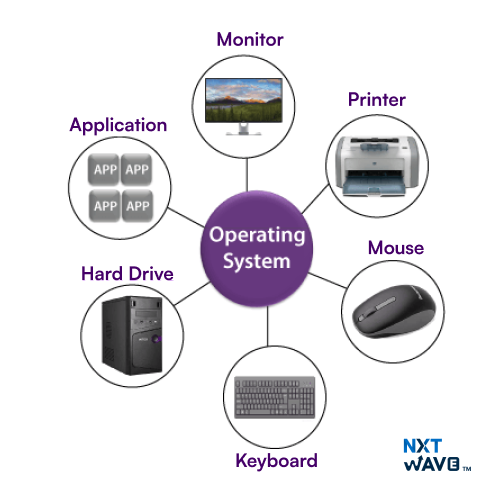
An operating system (OS) is system software that manages computer hardware and software resources, providing essential services for programs. It acts as an intermediary between users and the computer hardware, enabling tasks like file management, memory allocation, process scheduling, and device control. Common examples include Windows, macOS, and Linux. The OS ensures efficient operation, security, and user interaction with the computer by managing resources, executing commands, and supporting software applications through its various components like the kernel, user interface, and system utilities.
Core Components of Operating System
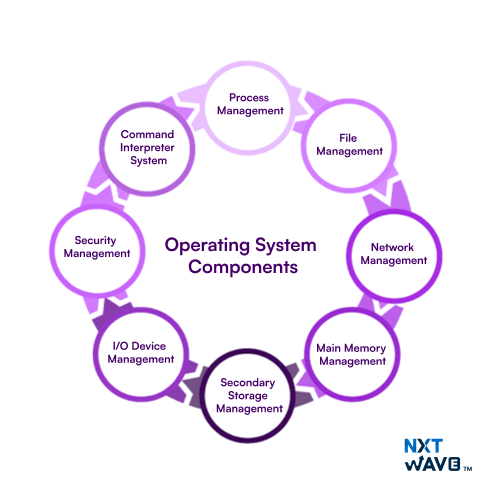
The operating system typically consists of several core components, each responsible for managing specific aspects of the system. These components include:
- Process Management: The OS manages the creation, execution, and termination of processes (programs) running on the system. This includes process scheduling, memory allocation, and resource allocation.
- Main Memory Management: The OS manages the allocation and deallocation of memory for processes, ensuring efficient use of system memory and preventing memory conflicts.
- File System Management: The OS provides a file system that allows applications to create, read, write, and delete files and directories. This includes file naming, directory structures, and file access control.
- I/O Device Management: The OS manages input/output (I/O) devices such as keyboards, mice, printers, and disk drives, providing a standardized interface for applications to interact with these devices.
- Network Management: The OS manages network communication, allowing applications to send and receive data over a network, and providing services such as socket management and network protocol handling.
- Secondary Storage Management: Controls data storage on devices like hard drives and SSDs, organizing files and managing reading/writing operations.
- Security Management: Protects system integrity and data by controlling user access, authentication, encryption, and managing security protocols.
- Command Interpreter System: Provides the user interface (CLI or GUI), interprets user commands, and executes system operations.
Key Characteristics of Operating System
Here are the key characteristics of the operating system:
Five Essential Characteristics of Operating System
An Operating System is defined by several key characteristics that enable it to manage resources and facilitate the user experience. Let’s explore the five essential characteristics of an OS:
1. Multitasking and Process Management
One of the primary roles of an Operating System is multitasking, which enables the system to run multiple processes concurrently. Through process management, the OS ensures each task receives CPU time, keeps track of processes, and coordinates their execution without conflicts. This enhances the efficiency of a system, allowing users to perform multiple tasks at once.
2. Memory Management
The Operating System controls the computer's memory (RAM) through memory management. It allocates space for different processes and ensures that each program has enough memory to run. The OS also handles memory leaks, deallocates memory when processes are terminated and maintains a virtual memory system when physical memory is insufficient.
3. Device Management
Device management is another critical function of an Operating System. It facilitates communication between the computer and peripheral devices (such as printers, hard drives, or mice). Through device drivers and management software, the OS enables users and applications to interact with hardware devices efficiently without needing to understand their inner workings.
4. File System Management
File system management refers to how the Operating System organizes and stores data on storage devices like hard drives or SSDs. It manages files and directories, provides access to files, handles file permissions, and ensures that data is securely stored and retrieved. It also organizes the data into logical structures, such as files and directories, to facilitate easy access and management.
5. Security and User Access Control
Security is a top priority for any Operating System. The OS protects data from unauthorized access, ensures system integrity, and provides mechanisms for user access control. Features like password protection, file encryption, and user authentication ensure that only authorized individuals can access sensitive data and system functions.
Types of Operating Systems
Here are the types of operating system:
1. Batch Operating System
A Batch Operating System is a type of operating system that does not interact with the computer directly. There is an operator who takes similar jobs having the same requirements and groups them into batches.
2. Time-sharing Operating System
Time-sharing Operating System is a type of operating system that allows many users to share computer resources (maximum utilization of the resources).
3. Distributed Operating System
Distributed Operating System is a type of operating system that manages a group of different computers and makes appear to be a single computer. These operating systems are designed to operate on a network of computers. They allow multiple users to access shared resources and communicate with each other over the network. Examples include Microsoft Windows Server and various distributions of Linux designed for servers.
4. Network Operating System
A Network Operating System is a type of operating system that runs on a server and provides the capability to manage data, users, groups, security, applications, and other networking functions.
5. Real-time Operating System
A Real-time Operating System is a type of operating system that serves a real-time system and the time interval required to process and respond to inputs is very small. These operating systems are designed to respond to events in real-time. They are used in applications that require quick and deterministic responses, such as embedded systems, industrial control systems, and robotics.
6. Multiprocessing Operating System
Multiprocessor Operating Systems are used in operating systems to boost the performance of multiple CPUs within a single computer system. Multiple CPUs are linked together so that a job can be divided and executed more quickly.
7. Single-User Operating Systems
Single-user operating Systems are designed to support a single user at a time. Examples include Microsoft Windows for personal computers and Apple macOS.
8. Multi-User Operating Systems
Multi-User Operating Systems are designed to support multiple users simultaneously. Examples include Linux and Unix.
9. Embedded Operating Systems
Embedded Operating Systems are designed to run on devices with limited resources, such as smartphones, wearable devices, and household appliances. Examples include Google’s Android and Apple’s iOS.
10. Cluster Operating Systems
Cluster Operating Systems are designed to run on a group of computers, or a cluster, to work together as a single system. They are used for high-performance computing and for applications that require high availability and reliability. Examples include Rocks Cluster Distribution and OpenMPI.
Embedded Systems and RTOS: Understanding Specific OS
Embedded systems are specialized computers used in various applications, such as robotics, automotive, and industrial control systems. A Real-Time Operating System (RTOS) is a critical component of embedded systems, responsible for managing resources, scheduling tasks, and ensuring predictable and timely execution. RTOS is designed to guarantee that tasks are completed within a specific time frame, making it essential for applications requiring real-time performance.
Characteristics of Embedded Operating Systems (EOS)
Here are the characteristics of embedded operating system(EOS):
- Resource Efficiency: EOS is designed to be compact and simple, consuming minimal resources such as RAM, ROM, and on-chip peripherals. This is due to the limited hardware available in embedded systems.
- Deterministic Timing Characteristics: EOS provides real-time responses, ensuring that tasks are executed within a set deadline. This is critical in applications where timely responses are essential, such as anti-lock braking systems or medical devices.
- Single-Task Focus: Embedded systems are designed for a specific role, resulting in efficient performance and prompt responses. This characteristic enables optimized resource utilization, boosted performance, and high reliability.
- Compactness: EOS is designed to be small in size, making it suitable for resource-constrained embedded systems. This compactness also contributes to its efficiency and reliability.
- Real-Time Responsiveness: EOS is designed to respond promptly to events and interrupts, ensuring that tasks are executed on time. This characteristic is essential in applications where timely responses are critical.
- Customizability: Due to the varying requirements of different embedded systems, EOS is often customized to meet specific application needs. This customization can include modifying the operating system’s functionality, optimizing its performance, or integrating it with specific hardware components.
Characteristics of Real-Time Operating System(RTOS)
Real-Time Operating Systems (RTOS) are designed to manage time-sensitive tasks with strict deadlines, ensuring reliable performance in critical applications. Some key characteristics of RTOS include:
- Predictability and Determinism: RTOS provides predictable and reliable behavior, ensuring that tasks are completed within a specified time frame.
- Priority-Based Scheduling: Tasks are assigned priorities, and the RTOS executes the highest-priority tasks first, ensuring that critical tasks are completed on time.
- Small Footprint: RTOS typically has a small footprint, making it suitable for embedded systems with limited resources.
- High Performance: RTOS is designed to provide fast and responsive performance, ensuring that tasks are completed quickly and efficiently.
- Timing Information: RTOS provides timing information, allowing developers to accurately predict and control the execution of tasks.
- Safety and Security: RTOS prioritizes safety and security, ensuring that the system operates reliably and securely, even in critical applications.
Key Functions and How They Relate to Characteristics
These key functions relate to the following characteristics of an Operating System:
- Licensing: Open-source OS (e.g., Linux) allows modification and customization, while commercial OS (e.g., Microsoft Windows) requires a license fee for use.
- Software Compatibility: Different OS types (e.g., open-source, commercial) may have varying levels of software compatibility, with some OSes supporting specific software applications or versions.
- Complexity: OS complexity can affect the ease of use, customization, and maintenance of the system, with simpler OSes (e.g., Chrome OS) designed for specific use cases and more complex OSes (e.g., Linux) offering greater customization options.
Common Operating Systems
1. Microsoft Windows
A widely used operating system for desktops and laptops, known for its broad software compatibility and user-friendly interface, commonly used in both personal and business environments.
2. Apple iOS
A mobile operating system designed for Apple devices like iPhones and iPads, known for its smooth user experience, security, and seamless integration with Apple’s ecosystem.
3. Google Android
An open-source mobile operating system used on a wide variety of devices, offering customization, flexibility, and deep integration with Google services, making it the most popular OS for smartphones.
How to Choose the Operating System?
When selecting the right Operating System (OS) for your needs, it's important to evaluate several key factors to ensure it aligns with your requirements. Below are the factors to consider:
- Cost Consideration: One of the primary factors in choosing an OS is its price. Some systems, like Linux, are open-source and free to use, while others, such as Windows and macOS, may require purchasing a license. If you're on a budget, free OS options might be the most suitable choice, but if you prefer specific features or applications that require a paid OS, this cost should be factored into your decision.
- Ease of Use: Accessibility is another important factor. Some Operating Systems, such as macOS and iOS, are known for their user-friendly interfaces, making them suitable for people with little technical knowledge. In contrast, Linux and certain versions of Windows might require a more technical understanding to fully utilize. Assess your comfort level and willingness to learn a new system when choosing the OS that best suits you.
- Application Compatibility: It’s essential to ensure that the OS you choose supports the applications you need. Some OSes have a larger selection of compatible software. For instance, Windows tends to support a wide range of applications, while macOS and Linux might be limited in certain areas. Be sure to check if your preferred software or any specialized tools are available on the OS you plan to use.
- Security Features: Different Operating Systems offer varying levels of security. macOS is often considered more secure by design due to its closed ecosystem and built-in privacy features. On the other hand, Windows may require additional steps, such as antivirus software, to achieve the same level of protection. If security is a high priority, consider how well each OS defends against cyber threats and how frequently updates and patches are released.
Important Interview Questions for Operating System
Candidates can expect these kinds of Viva interview questions for the operating system:
1. What is a process?
Processes are instances of programs that are running in an operating system. It consists of the program code, data, and system resources. The OS manages processes, ensuring they run efficiently and independently, handling their scheduling, execution, and termination.
2. How are different states defined in a process?
There are many different states of a process in the operating system:
- Running: The CPU is currently carrying out the process.
- Ready: The process is awaiting CPU time but is ready to run.
- Waiting: The process is in a blocked state, pending the occurrence of an external event like I/O completion, before resuming.
3. What is virtual memory?
The concept of virtual memory refers to an operating system using disk space as an extension of RAM. This enables larger applications to run on systems with limited physical memory by swapping data between RAM and disk storage as needed.
4. What is inter-process communication (IPC)?
An interprocess communication (IPC) system enables processes to exchange data and coordinate their activities while executing simultaneously. Common IPC methods include pipes, message queues, shared memory, and semaphores.
5. What is the purpose of a kernel in an operating system?
The kernel is the core component of an operating system that manages system resources such as CPU, memory, and device I/O. It operates at a low level, providing essential services like scheduling, resource allocation, and security enforcement.
Conclusion
In conclusion, the characteristics of an operating system include process management, memory management, file system management, and security. These features allow the OS to efficiently manage hardware resources, support multitasking, ensure system stability, and provide a user interface. Overall, the characteristics of an operating system are essential for smooth and reliable computer performance.
Gain Industry-Relevant Skills and Secure a Tech Job Before College Ends!
Explore ProgramFrequently Asked Questions
1. What are the three main characteristics of an Operating system?
Operating systems are characterized by three main characteristics:
- Multitasking: Runs multiple processes at once.
- Resource Management: Efficiently allocates system resources.
- User Interface: Facilitates user interaction with the system.
2. What are the characteristics of operating system?
Characteristics of Operating system: Concurrency, Hardware Abstraction, Resource Allocation, Security, Fault Tolerance, Scalability, Compatibility.
3. What are the key functions performed by an operating system?
Functions of the operating system:
- Process Management
- Memory Management
- File Management
- Device Management
- User Interface
- Networking
- Security Management.