Single User Operating Systems are the backbone of single-user computing that gives an individual a basic, effective, and secure platform for working with a single user. These operating systems are meant to administer the computer resources in single-user mode, and they are perfectly suitable to work in browsing, document preparation, and executing personal software. As opposed to multiuser systems, these operating systems are dedicated to personal use, making work easy and interaction easy.
This article describes single-user operating systems, covering their types, features, advantages, disadvantages, and practical applications, as well as comparisons with other system types.
What is an Operating System (OS)?
An Operating System (OS) is software that manages computer hardware and software resources while providing services for computer programs. It is the core component of a computer system and acts as a bridge between users and the hardware.
Important features of an Operating System
- Resource Management: It allocates system resources such as CPU, memory, and disk to programs.
- User Interface: It offers an interface to interact with the system that is simple to use (Graphical User Interface or Command-Line Interface).
- Program Execution: It makes programs executable by running resources and prerequisites.
- File Management: It manages file and directory creation, removal, and access.
- Security: It guards programs and data from abuse.
- Error Detection: It identifies and removes errors in order to generate fault-free operations.
What is Single User Operating System?
A Single User Operating System is an operating system that manages a single user at a time. It manages all the resources of the computer such as memory, processor, and storage in order to provide the active user an access to run applications smoothly. These operating systems give the user an easy interface, and operating the computer and doing tasks like file management, program execution, and internet connection is very simple. Security aspects are naturally inherent for the protection of data of the user, effective resource management being a key issue so that it does not hinder. Single-user operating systems are best suited to personal computers, laptops, tablets, and certain mobile devices where one individual is using the device at any given time.
Features of Single User Operating Systems
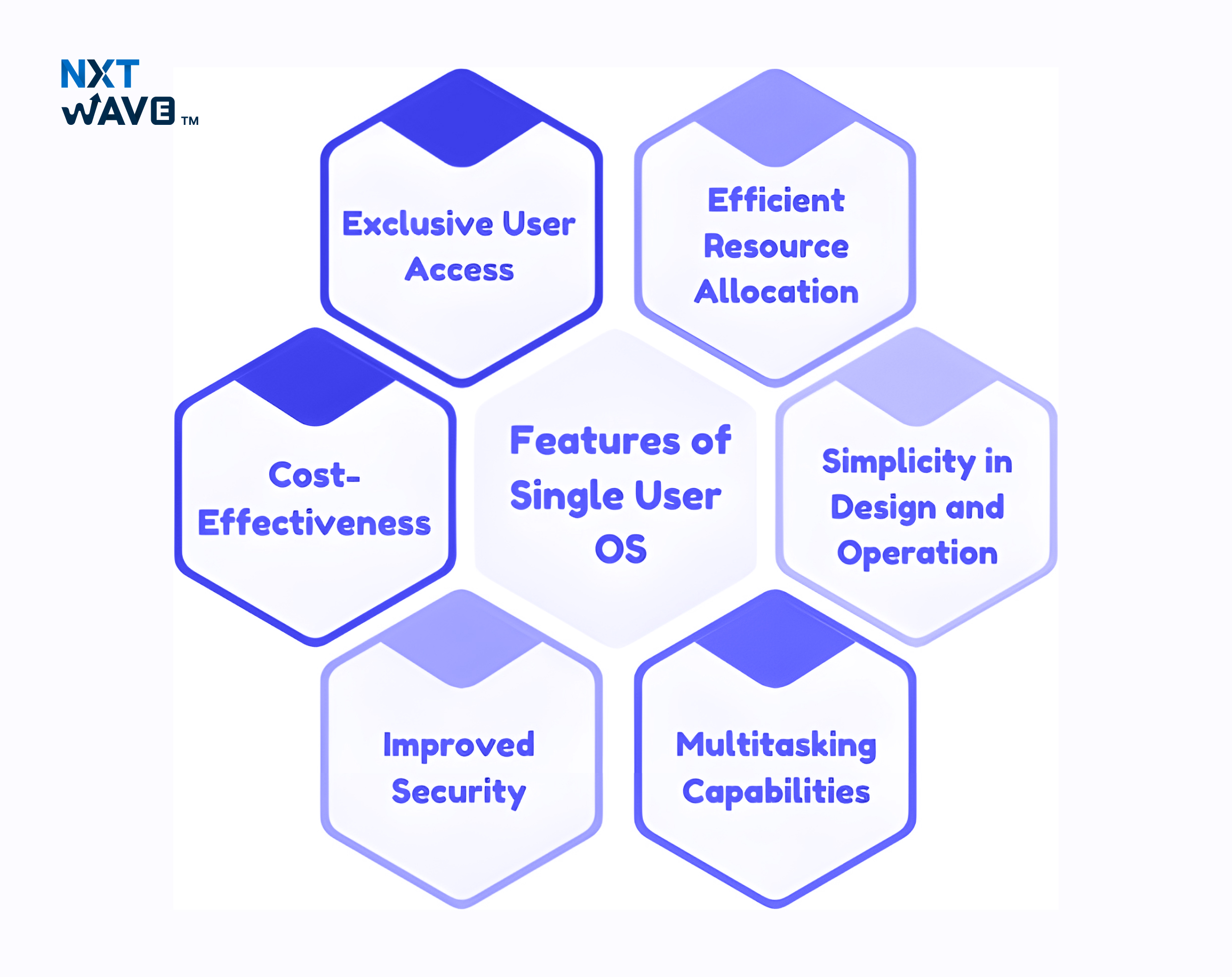
Here are some key features of Single User Operating Systems, which are designed to provide an optimized, secure, and simple environment for individual users.
1. Single User Access
Single User Operating Systems operate to restrict use to a single user at any given point in time. This leaves the resources, programs, and files exclusively for the current user, maximizing performance as well as security.
2. Optimal Resource Allocation
These systems allocate resources like CPU, memory, and storage solely to the local user. This dedicated allocation enhances system performance by preventing resource contention, ensuring that processes execute without interference.
3. Simplicity in Design and Operation
Single User Operating Systems are user-friendly, with direct interfaces for personal needs. Multi-user management eliminated complicates the system, allowing non-professionals to use it. Installation of software and troubleshooting are also simplified.
4. Multitasking Capabilities
Even though they are meant for one user, most of them can multitask. Users may run several applications at a time depending on the capacity of the hardware, like editing a document while browsing the internet or listening to music.
5. Enhanced Security
By limiting access to a single user, these systems reduce the likelihood of unauthorized access or data theft. The ease of user administration assures that security features, including password guard and access control, are simpler to install and maintain.
6. Cost-Effectiveness
These are cost-effective as they do not require the advanced infrastructure needed for multi-user environments. This affordability makes them suitable for personal computers, laptops, and small-scale applications.
Types of Single User Operating Systems
Single user operating systems can be classified into two types based on their multitasking capabilities: single user single-tasking operating systems and single user multi-tasking Operating Systems. These systems change in their ability to handle multiple processes and user tasks simultaneously.
1. Single User Single Tasking Operating System
A Single User Single Tasking Operating System is designed to handle only one task or process at a time. These operating systems are found in devices with limited processing capabilities and are suitable for basic, specific tasks. The system can only execute one program or process, requiring the user to complete that task before moving on to another.
An example of a Single User Single Tasking Operating System is MS-DOS (Microsoft Disk Operating System). MS-DOS was used on early personal computers, where users could run one program simultaneously.
Another example is Palm OS, which was used in early mobile devices. Palm OS allows users to run one application at a time, such as a calendar or an address book, making it a useful but simple system for managing basic tasks.
2. Single User Multi task Operating System
In contrast, a single user multi-tasking Operating System enables a single user to run multiple tasks or applications simultaneously. These systems are designed to support modern computing needs, where users frequently switch between various applications such as web browsers, email clients, and media players.
Examples of Single User Multi-Tasking Operating Systems include Windows, macOS, and Linux. Windows allows users to run multiple programs at once such as editing a document in Microsoft Word, browsing the internet, and listening to music through a media player.
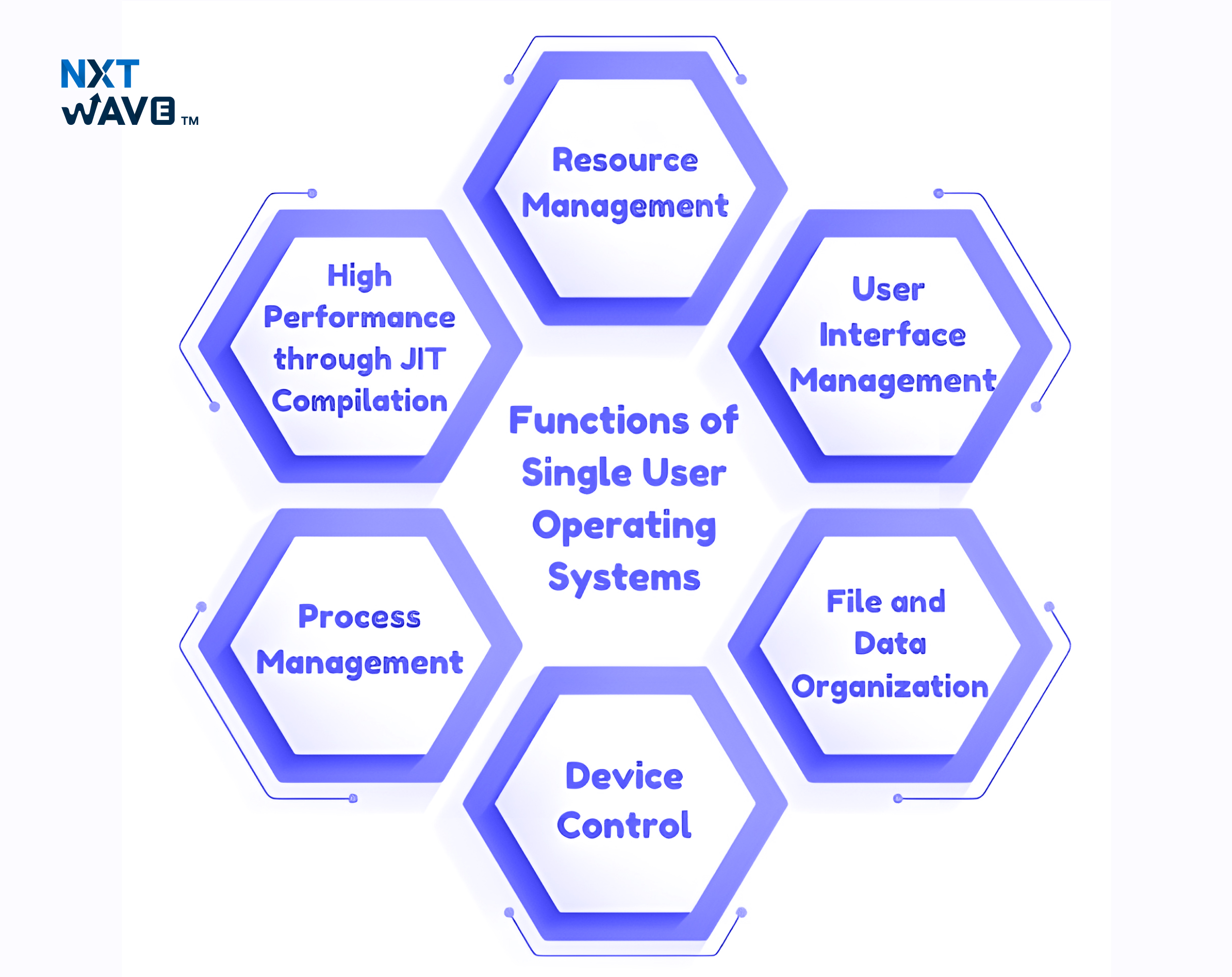
Functions of Single User Operating Systems
1. Resource Management
One of the most critical tasks of any operating system is resource management, primarily in the single-user environment where the whole system resources are allocated to a single user. This includes the allocation and arrangement of vital resources like the CPU, memory (RAM), and storage media (hard disks, SSDs).
2. User Interface Management
User Interface (UI) management is another role that ensures the user can communicate with the computer efficiently. A Windows Single User Operating System offers a Graphical User Interface (GUI) or a Command-Line Interface (CLI), depending on the platform and user requirements.
- Graphical User Interface (GUI): A GUI is a visually driven interface that allows users to interact with the system using icons, buttons, and menus. It is designed for ease of use, making it ideal for users unfamiliar with command-based operations.
- Command-Line Interface (CLI): A CLI provides users with text-based input and output. While it requires more technical knowledge, it offers advanced users more control over system operations.
3. File and Data Organization
One of the functions of a Single User Operating System is the management of files and data. The operating system provides a structured environment for creating, storing, modifying, and deleting files and directories.
4. Device Control
A key function of Windows Single User Operating Systems is the control and management of input and output devices connected to the computer. These devices include keyboards, mice, printers, monitors, and external storage devices such as USB drives.
The operating system acts as an intermediary between the hardware and the software, ensuring that commands from the user are properly translated into actions on the devices.
5. Process Management
Process management is an important function of Single User Operating Systems, mainly in systems that support multitasking. The operating system is responsible for executing user commands and managing active processes.
Advantages of Single User Operating Systems
Single User Operating Systems are made for a single user and equipped with a variety of advantages that enhance usability, performance, security, and economic efficiency. The advantages make them best suited for personal computing, especially if the system is used by one user at a time.
1. Ease of Use
One benefit of Windows Single User Operating Systems is that they are easy to use. They are meant to be easy, and they are suitable for a single or technical user. They are easy to install and utilize with minimal technical knowledge required.
For example, Windows and macOS have graphical user interfaces (GUIs) through which users can perform tasks such as file management, program installation, and internet browsing with ease, making them accessible to people with varying levels of technical knowledge.
2. Performance Optimization
Performance optimization is the main advantage of a Single User Operating System. The entire system's resources-potentially including CPU, RAM, and storage-are allocated solely to that single user. Thus, to be more specific, it is said that the user has the full attention of the system, which means better performance, faster processing speed, and fewer interruptions.
3. Enhanced Security
Single User Operating Systems inherently offer improved security by focusing on a single user. Since only one user interacts with the system at a time, there is a lower risk of unauthorized access. Security measures such as passwords and encryption are easier to implement and monitor in single-user environments because only one user’s data needs to be protected.
4. Cost-Effectiveness
Single User Operating Systems tend to be more cost-effective than their multi-user counterparts. They require less complex hardware and software infrastructure, which reduces both the initial setup cost and ongoing maintenance costs.
Disadvantages of Single User Operating Systems
Though Single User Operating Systems have numerous advantages, they also present certain limitations. These limitations can be limiting, especially in a situation where scalability and collaboration are of great importance.
1. Restricted Functionality
One of the major disadvantages of Single User Operating Systems is their restricted functionality in multi-user environments. These systems are designed to fulfill the needs of only one individual at a time. As a result, they cannot efficiently handle multiple users accessing the system simultaneously.
2. Scalability Concerns
Single User Operating Systems also face scalability concerns. These systems are limited in expanding to accommodate larger user bases or networks. As a growing business or network demands increase, the system's ability to handle more users, devices, or processes becomes strained.
3. Single Point of Failure
Another disadvantage of Single User Operating Systems is the single point of failure. Since only one user can access the system, losing access or system failure can hinder productivity. If something goes wrong, whether it’s a system crash, a hardware failure, or a user’s inability to log in, then the entire user’s workflow is disrupted.
Difference Between Single User and Multi-User Operating Systems
The following are the most important differences and features of Single User Operating Systems (SUS) and Multi-User Operating Systems (MUOS), with special comparison of their operation, features, and applications:
Conclusion
The single-user operating system is still vital to personal computing, providing tailored solutions for the individual user. Its ease, resource utility, and user-friendliness make it perfectly compatible with single-user use. Although it's not supplied to support multi-user systems, its use in personal and embedded computing keeps it relevant.
Upgrade Your College Journey by Gaining Job-Relevant Skills Early
Level Up With UsFrequently Asked Questions
1. What is a single-user operating system?
Single-user operating system is made for a single user at a time. It allocates the system resources like memory, CPU, and storage to that specific user to prevent any other user from interfering with the operation of the system. Personal desktop OS like Windows or macOS fall under this category.
2. What is an example of a single processing operating system?
An example of a single-processing operating system is MS-DOS. This system allows the computer to process one task simultaneously, limiting multitasking capabilities. It is used in older devices or systems with minimal resource requirements.
3. Which is the most popular single-user operating system?
The most popular single-user operating system is Windows. It is used for personal computing across home PCs, laptops, and tablets. Windows provides a user-friendly interface and is known for its compatibility with various applications.
4. How does a single-user operating system work?
A single-user operating system allocates all of the system’s resources, such as the CPU, RAM, and storage, to one user at a time. It confirms that no other user or process interferes with the tasks the user is performing, optimizing performance for that individual.
5. Can a single-user operating system be used for multiple tasks?
Many modern single-user operating systems, like macOS and Windows, support multitasking, where a single user can run multiple applications simultaneously. However, the system still manages these tasks for one user without supporting concurrent access by multiple users.
6. What are the limitations of a single-user operating system?
One limitation of a single-user operating system is its inability to support multiple users simultaneously. This makes it unsuitable for environments where several people need to access the system or its resources concurrently, such as in large companies or server environments.
7. Are single-user operating systems secure?
Yes, single-user operating systems are generally secure because they are designed to be used by one person at a time. This simplifies the management of access controls, and the user can configure security settings such as passwords and encryption to protect their data from unauthorized access.





.avif)