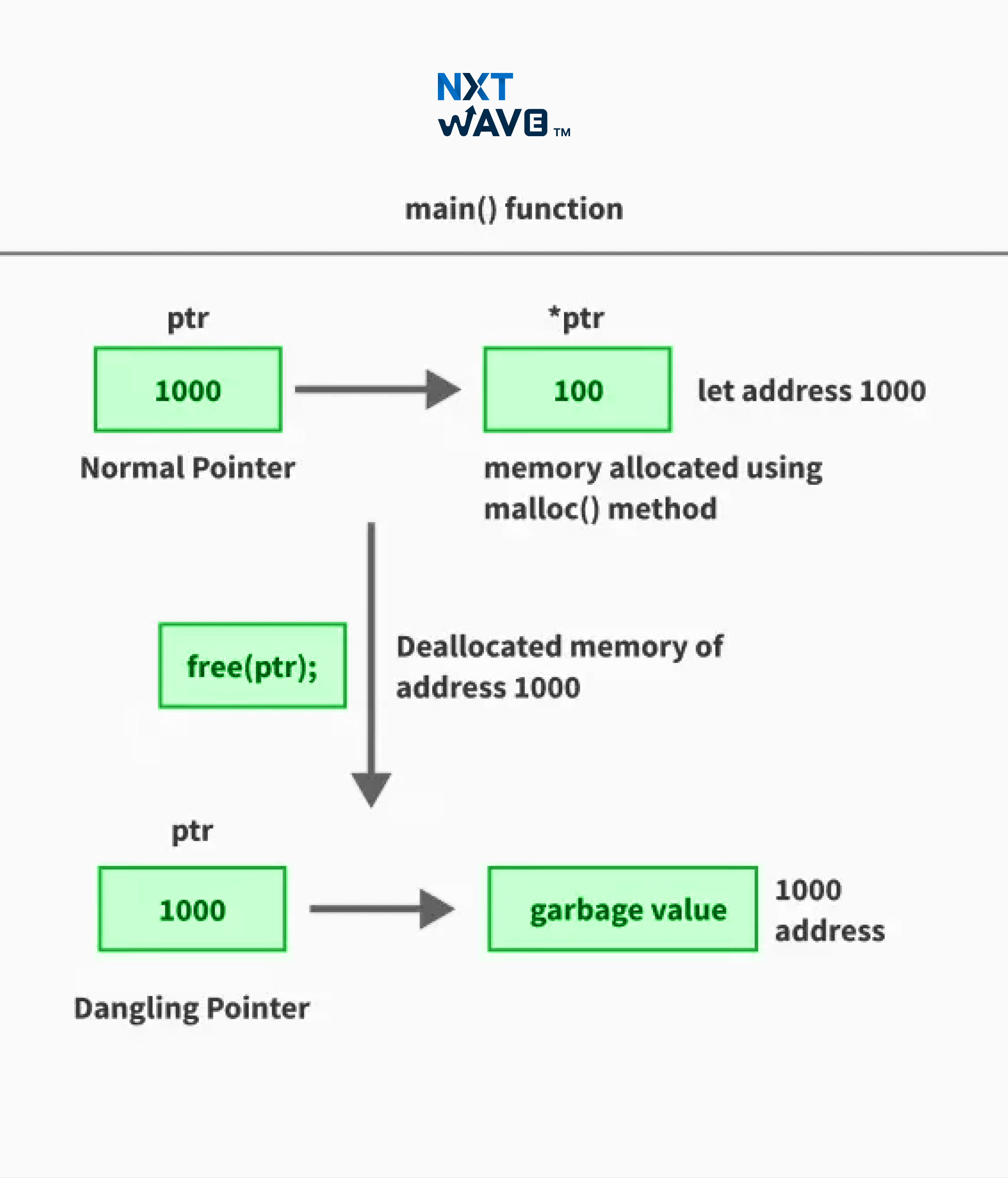
Pointers are an essential feature in programming, especially in languages like C and Assembly. They allow direct memory access, making dynamic memory management more efficient. However, pointers can also cause issues. The trickiest of them all that can come up when working with pointers is the problem of dangling pointers.
A Dangling Pointer is basically a bug that can lead to things like unpredictable behaviour, segmentation issues, and memory leaks in programs. In this blog, we will give a talk about dangling pointers in C, understanding their causes and risks, and how to prevent them.
What Is a Pointer in C?
In C, a pointer is a variable that stores the address of another variable. It is declared using the * operator.
Example
int a = 10;
int *ptr = &a;  // Pointer storing the address of 'a'
Pointers play a key role in memory management, which enables dynamic storage allocation, efficient function parameter passing, and data structures like linked lists. However, improper use of pointers can lead to bugs that are hard to detect and even security vulnerabilities; hence, careful handling is essential.
What is a Dangling Pointer in C?
A dangling pointer in C is a pointer that continues to reference a memory location that is no longer valid or has already been freed. Since the memory it points to has been deallocated, if the program makes an attempt to access or modify it can lead to undefined behaviour, crashes, or data corruption.
To put it in even simpler words, a dangling pointer "dangles" because it still holds an address, but the data at that address no longer exists or belongs to another process. This problem can happen due to improper memory management, such as freeing memory without resetting the pointer, returning local addresses from functions, or using a pointer after its scope has ended.
Since dangling pointers can cause issues that are hard to debug, they are considered a serious problem in C programming. Proper handling, such as setting pointers to NULL after freeing them, is crucial to prevent these errors.
As seen in the diagram, Pointer1 and Pointer2 correctly reference the allocated objects Object1 and Object2, respectively. However, Pointer3 points to a memory location that has already been deallocated, making it a dangling pointer. Attempting to access Pointer3 can lead to undefined behaviour or crashes.
Dynamic memory allocation using malloc() and calloc()
In C, dynamic memory allocation plays a key role in handling memory efficiently. Instead of defining memory size during compilation, we can allocate it at runtime based on program needs. This is particularly useful when dealing with arrays, linked lists, trees, and other data structures where the required memory size may change.
C provides two commonly used functions for dynamic memory allocation:
malloc(): It allocates a specified amount of memory but does not initialize it. This means the memory may contain garbage values.
calloc(): Allocates memory like malloc() but also initializes all allocated bytes to zero.
If memory allocation fails, malloc() and calloc() return NULL. Hence always check if the pointer is valid before using it.
Example
int *ptr = (int *)malloc(5 * sizeof(int));  // Allocating memory for 5 integers
int *arr = (int *)calloc(5, sizeof(int));   // Allocating and initializing memory for 5 integers
Dynamic memory allocation is useful, but if it is not handled properly, it can lead to memory leaks and dangling pointers. The result is that they make debugging difficult and can cause unexpected program crashes.
Deallocation using the free() function
Allocating memory dynamically is useful. But if you fail to release it when it's no longer needed, it can lead to memory leaks. It also gradually consumes system resources which slow down processes and lead to a crash. In C, the free() function is used to deallocate dynamically allocated memory.
When free() is called on a pointer, the memory block it references is returned to the system and it becomes available for future allocations. However, the pointer itself still holds the old address. So it becomes a dangling pointer if not handled properly.
Example
int *ptr = (int *)malloc(sizeof(int));  // Allocate memory
*ptr = 42;  // Assign a value
free(ptr);  // Deallocate memory
ptr = NULL;  // Avoid dangling pointer
You have to set the pointer to NULL after freeing to prevent accessing the invalid memory accidentally. Proper deallocation is crucial for good memory management since it is necessary to prevent dangling pointers, segmentation faults, and unpredictable program behavior.
Examples of Dangling Pointer in C
Here is a scenario where dangling pointers arises:
A function returning the address of a local variable can cause dangling pointer issues because the local variable gets destroyed when the function exits.
Example
#include <stdio.h>
int* getPointer() {
int num = 10; // Local variable
return # // Returning address of local variable (dangerous)
}
int main() {
int *ptr = getPointer();
printf("%d\n", *ptr); // Undefined behavior
return 0;
}
Here, num is a local variable inside getPointer(), so its memory is released when the function returns. The pointer ptr in main() now holds an invalid address, leading to a dangling pointer.
Output
/tmp/v3rEgHFioy/main.c: In function 'getPointer':
/tmp/v3rEgHFioy/main.c:5:12: warning: function returns address of local variable [-Wreturn-local-addr]
	5 |     return #  // Returning address of local variable (dangerous)
  	|        	^~~~
Segmentation fault


=== Code Exited With Errors ===
Causes of Dangling Pointers
Dangling pointers arise when memory is accessed after it has been freed, gone out of scope, or returned from a function. Let’s explore the key reasons behind this issue in C programming.
1. Deallocation of Memory
A dangling pointer is often created when memory is explicitly deallocated using free(), but the pointer still holds the address of the freed memory. Since the memory is no longer valid, accessing it can cause unpredictable behaviour or program crashes.
#include <stdio.h>
#include <stdlib.h>

int main() {
    int *ptr = (int*) malloc(sizeof(int));  // Allocating memory dynamically
    *ptr = 42;  // Assigning value
    printf("Before free: %d\n", *ptr);

    free(ptr);  // Memory deallocated
    printf("After free: %d\n", *ptr);  // Accessing freed memory (dangerous)

    return 0;
}
Output
Before free: 42
After free: 162290


=== Code Execution Successful ===
Why That Happened?
- malloc() dynamically allocates memory for an integer.
- The pointer ptr stores the allocated memory address and assigns it the value 42.
- free(ptr); deallocates the memory, making the pointer dangling.
- Accessing *ptr after free() results in undefined behaviour, which could print garbage values ( like 162290 in the output) or cause a segmentation fault.
2. Returning Addresses of Local Variables
A dangling pointer can also occur when a function returns the address of a local variable. Since local variables exist only within the function’s scope, their memory is deallocated once the function exits. If a pointer outside the function tries to access this memory, the behaviour becomes undefined.
Example
#include <stdio.h>
int* getPointer() {
int num = 20; // Local variable stored in stack memory
return # // Returning address of local variable (dangerous)
}
int main() {
int *ptr = getPointer(); // 'ptr' holds an invalid address
printf("Value: %d\n", *ptr); // Accessing invalid memory (undefined behavior)
return 0;
}
Output
/tmp/yUq5WmvNlu/main.c: In function 'getPointer':
/tmp/yUq5WmvNlu/main.c:5:12: warning: function returns address of local variable [-Wreturn-local-addr]
    5 |     return #   // Returning address of local variable (dangerous)
      |            ^~~~
Segmentation fault


=== Code Exited With Errors ===
Why That Happened
- The function getPointer() declares a local variable num inside the stack.
- When the function exits, num is automatically deallocated (its memory is freed).
- Returning &num means returning an invalid memory address.
- The pointer in main() tries to access a memory location that no longer exists, causing a segmentation fault.
3. Variable Scope Issues
A dangling pointer can occur when a pointer refers to a variable that goes out of scope. This happens when a pointer stores the address of a local variable, but the variable gets automatically deallocated when the function exits. Accessing such a pointer after the function returns leads to undefined behaviour, which may cause segmentation faults or garbage values.
Example
#include <stdio.h>
int* getPointer() {
int num = 50; // Local variable inside function
return # // Returning address of local variable (dangerous)
}
int main() {
int *ptr = getPointer(); // Storing address of deallocated variable
printf("Value: %d\n", *ptr); // Accessing out-of-scope memory (undefined behavior)
return 0;
}
Output
/tmp/rxCJOkd3HG/main.c: In function 'getPointer':
/tmp/rxCJOkd3HG/main.c:5:12: warning: function returns address of local variable [-Wreturn-local-addr]
    5 |     return #   // Returning address of local variable (dangerous)
      |            ^~~~
Segmentation fault


=== Code Exited With Errors ===
Why That Happened
- The function getPointer() declares a local variable num.
- The function returns the address of num.
- When getPointer() exits, num gets deallocated, but ptr in main() still holds the old memory address.
- Accessing *ptr now leads to undefined behaviour, which may print garbage values or cause a segmentation fault.
How To Avoid Dangling Pointer in C?
Dangling pointers can cause undefined behaviour, crashes, or security vulnerabilities. No,w let’s look at some ways how to avoid dangling pointers.
1. Set Pointers to NULL After Freeing
After freeing dynamically allocated memory using free(), always set the pointer to NULL. When you do that, the pointer does not reference invalid memory. That prevents accidental access to deallocated space. A NULL pointer is safe because it can be easily checked before dereferencing, reducing the risk of undefined behaviour.
int *ptr = (int *)malloc(sizeof(int)); // Dynamically allocate memory
free(ptr); // Free the allocated memory
ptr = NULL; // Set pointer to NULL to avoid dangling pointer
2. Avoid Returning Addresses of Local Variables
Never return the address of a local variable from a function, as the variable gets destroyed when the function exits. Accessing such memory leads to undefined behaviour. Instead, allocate memory dynamically or pass a pointer to a valid memory location.
int* getPointer() {
    int *ptr = (int *)malloc(sizeof(int)); // Allocate memory dynamically
    *ptr = 100; // Assign value
    return ptr; // Return valid pointer
}
3. Limit Pointer Scope
Restrict the scope of pointers to the smallest possible block to minimise the risk of them becoming dangling pointers. Using local variables and returning values instead of pointers helps maintain safer memory management.
void safeFunction() {
    int localVar = 10;  // Local variable
    int *ptr = &localVar;  // Pointer to local variable
    // Use ptr within this function only
}
4. Use malloc() or calloc() for Dynamic Memory Allocation
When returning pointers from functions, always use malloc() or calloc() to allocate memory dynamically. This ensures that the memory remains valid even after the function exits, preventing dangling pointer issues. However, remember to free the allocated memory when it's no longer needed.
int* createArray(int size) {
    int *array = (int *)malloc(size * sizeof(int)); // Allocate memory for an array
    if (array == NULL) {
        printf("Memory allocation failed.\n");
        return NULL; // Return NULL if allocation fails
    }
    return array; // Return the pointer to the allocated memory
}
5. Avoid Pointer Arithmetic
Pointer arithmetic can lead to accessing unintended memory locations which can cause undefined behavior or dangling pointers. If a pointer is incremented or decremented incorrectly, it may point to freed or invalid memory. To prevent this avoid unnecessary pointer calculations and always validate pointer operations.
void unsafePointerArithmetic() {
	int arr[3] = {10, 20, 30};  // Array of integers
	int *ptr = arr;  // Pointer to the first element

	ptr++;  // Moves to the next element (safe)
	ptr += 10;  // Unsafe: Pointer moves beyond allocated memory
}
Risks Of Dangling Pointers in C
Using dangling pointers can lead to serious issues in a program. Here’s what can go wrong:
1. Undefined Behavior: A dangling pointer points to an invalid memory location. Accessing it may cause unexpected values, crashes, or unpredictable program behaviour.
2. Memory Corruption: Writing to a dangling pointer can overwrite memory that no longer holds valid data, leading to corruption and unpredictable errors.
3. Security Vulnerabilities: Attackers can exploit dangling pointers to inject malicious code, making programs vulnerable to hacking.
4. Program Instability: Dangling pointers often cause random crashes or runtime errors that are difficult to debug and fix.
Debugging Dangling Pointer Problems
Detecting and fixing dangling pointers can be challenging. But some tools and techniques are designed to make it easy to find and debug it:
1. Using Debugging Tools
Valgrind: A powerful tool that detects memory leaks, invalid memory access, and uninitialised memory usage in C programs. It helps identify dangling pointer issues effectively.
GDB (GNU Debugger): Use features like watchpoints and memory tracking to monitor pointer values and catch dangling pointer accesses during program execution.
2. Analyzing Core Dumps
If a program crashes due to a dangling pointer, analysing the core dump can help trace the exact location where the invalid memory access occurred. This is useful for debugging segmentation faults caused by dangling pointers.
Dangling Pointer in C++
Just like in C, dangling pointers in C++ occur when a pointer continues to reference a memory location that is no longer valid. Improper memory management is usually the cause of this and can cause undefined behavior, crashes, or security vulnerabilities. The common cases that lead to dangling pointers in C++ include:
Deallocating memory using delete or free(): If a pointer still holds the address of deallocated memory, accessing it results in unpredictable behavior.
Returning the address of a local variable: When a function returns a pointer to a local variable, the variable gets destroyed once the function exits. Hence it makes the pointer invalid.
Variable going out of scope: If a pointer references a variable declared inside a block or function, the pointer becomes dangling once the block ends.
Example
In this example, the pointer ptr dynamically allocates memory for an integer and stores the value 10. The memory is freed using delete ptr, but ptr still holds the old address. Attempting to access *ptr after deletion leads to undefined behavior, possibly causing a crash or garbage output.
#include <iostream>

void danglingPointerExample() {
	int *ptr = new int(10); // Dynamically allocate memory
	std::cout << "Value before deletion: " << *ptr << std::endl;

	delete ptr; // Deallocate memory
	std::cout << "Trying to access deleted memory: " << *ptr << std::endl; // Undefined behavior
}

int main() {
	danglingPointerExample();
	return 0;
}
Output
Value before deletion: 10
Trying to access deleted memory: 197924


=== Code Execution Successful ===
Smart Pointers in C++
Smart pointers help to manage memory automatically and reducing the risk of dangling pointers. Unlike raw pointers, they free the allocated memory when it is no longer needed. Smart pointers come from the <memory> header and prevent memory leaks by handling deallocation. By using smart pointers, C++ programmers can write safer code thereby avoid common pitfalls like dangling pointers and manual memory management mistakes.
The three main types of smart pointers in C++ are:
1. std::unique_ptr: Holds exclusive ownership of an object and deletes it when it goes out of scope.
2. std::shared_ptr: Allows multiple pointers to share ownership of an object, deleting it when the last owner is destroyed.
3. std::weak_ptr: A non-owning reference to shared_ptr, used to avoid cyclic dependencies.
Example
In the program, the std::unique_ptr<int> automatically manages memory for the integer. The allocated memory is freed automatically when ptr goes out of scope. Hence there’s no need to manually call delete, reducing the risk of dangling pointers.
#include <iostream>
#include <memory> // Required for smart pointers

void smartPointerExample() {
	std::unique_ptr<int> ptr = std::make_unique<int>(10); // Using unique_ptr
	std::cout << "Value: " << *ptr << std::endl;
} // ptr is automatically deleted when it goes out of scope

int main() {
	smartPointerExample();
	return 0;
}
Output
Value: 10


=== Code Execution Successful ===
Best Practices To Avoid Dangling Pointers
Following these practices helps prevent dangling pointers and ensures safer memory management in C and C++:
1. Follow the RAII Principle: Resource Acquisition Is Initialization (RAII) ensures that resources like memory are automatically managed using objects. It reduces the risk of memory leaks and dangling pointers.
2. Avoid Returning Local Addresses: Never return the address of a local variable. Instead, use dynamic memory allocation (malloc()/new) or static variables so the pointer remains valid.
3. Regularly Test with Debugging Tools: Use Valgrind, GDB, and AddressSanitizer frequently during development to detect memory-related issues before they become critical.
4. Document Pointer Ownership: Clearly define who owns the allocated memory in your code. Proper documentation helps prevent accidental deallocation and misuse of pointers.
Conclusion
Dangling pointers are one of the most common yet problematic issues in C programming. They can lead to program crashes, security vulnerabilities, and unpredictable behaviour. However, with a solid understanding of how they occur and by following proper coding practices, you can minimise these risks and write more secure, efficient, and bug-free code.
For students learning to code, mastering pointers and memory management is essential. Handling pointers correctly sets you apart as a skilled programmer and reduces debugging headaches. Want to strengthen your coding skills and become an expert in C programming? Join CCBP 4.0 Academy and take your learning to the next level!
Frequently Asked Questions
1. How do you identify a dangling pointer in C?
A dangling pointer is one that points to memory that has been freed or refers to a local variable that is out of scope. You can detect it by using debugging tools like Valgrind or checking if a pointer is still valid before accessing it.
2. How do you fix a dangling pointer?
To prevent or fix a dangling pointer, follow these practices:
- Set pointers to NULL after freeing memory.
- Avoid returning addresses of local variables.
- Use smart pointers in C++ to manage memory automatically.
- Limit pointer scope to avoid unintentional access.
3. What is a wild pointer in C?
A wild pointer is an uninitialised pointer that holds a random memory address before its first assignment. Using it can lead to unpredictable behaviour, segmentation faults, or crashes. Always initialise pointers before using them to prevent wild pointers.
4. What are the risks of using dangling pointers?
Dangling pointers can lead to undefined behaviour, memory corruption, security vulnerabilities, and program crashes. They are one of the most difficult bugs to debug and can expose programs to attacks like buffer overflow exploits.
5. How do debugging tools help detect dangling pointers?
Tools like Valgrind, GDB, and AddressSanitizer help identify invalid memory accesses by tracking heap allocations, deallocations, and pointer references. Core dumps can also help analyse pointer-related crashes.





.avif)